Using Bing Chat to edit HTML email templates
- awhiting227
- Apr 8, 2023
- 2 min read
In most lifecycle marketing roles, the marketer is relied on for everything across the board including strategy, copywriting, marketing automation expert, analytics & of course email design.
But what if you're not an email designer who writes HTML and CCS?
Being in that boat myself, I've spent countless hours fidgeting with HTML blocks, trying to add or move a section around, only to destroy the entire template and have to hit control z enough times to get back to my starting point to try again.
With the introduction of Bing Chat using Chat GPT-4 though, it would seem struggling to make updates to email template HTML may soon be a thing of the past.
Here is an example of how I used Bing Chat to edit one of my email templates, turning a potential headache into a walk in the park, and a quick one too.
How to: change the size and weight of a CTA using Bing Chat
To get started I jumped into the HTML of an email template where I was hoping to test increasing the size of one of the CTAs - both by pixels and weight.
I went wide and highlighted the entire block of code from <td align="left" to </td align>. As a noob I figure the more I could include the share with Bing Chat the better.

From there I headed over to the new Bing and entered the chat section to make my request in human language.

A few second later the updates were delivered.
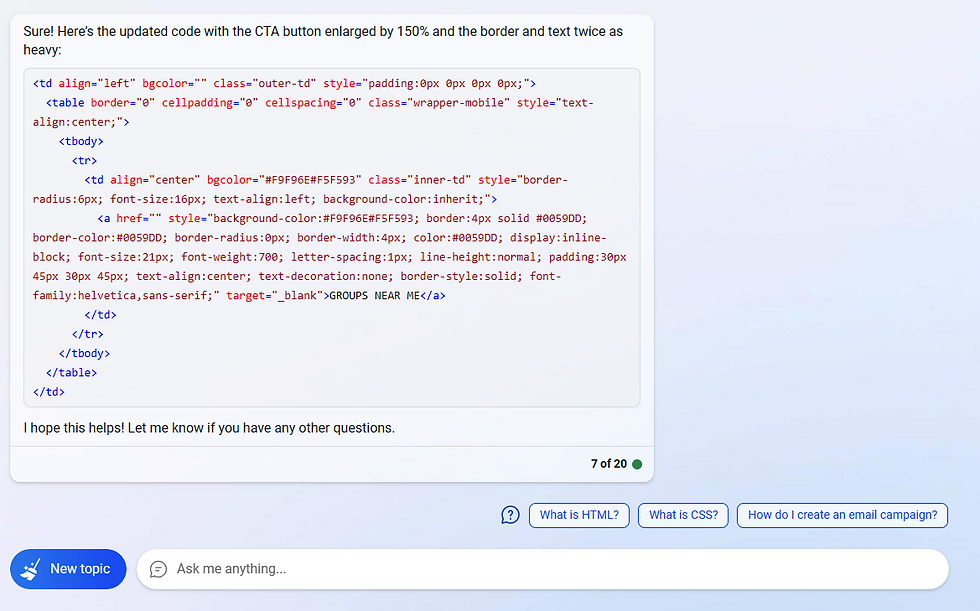
I copied the delivered code and pasted it back into my HTML template and boom, my update was complete.

Leaning on Bing Chat I was able to save myself probably 20 minutes of trial and error with the HTML to make this happen. Plus, my blood pressure remained more normal.
While this a very simple use case, the purpose of sharing is to serve as inspiration. Take advantage of this tool, especially when it comes to adjustments to HTML for email. Messing around with adjustments like these, this tool really can do a lot of the heavy lifting when it comes to HTML coding.
An additional tip:
Don't assume this is a one and done interaction. For example, if you are creating a new snippet of code and realize you want to make an adjustment to something and the last piece of code is in your chat, you can follow up and say "Add additional 5x margins to the code above" and Bing will understand what you want. Another example - realize your code is not optimized for mobile? Ask Bing to make your chat responsive for mobile. It can do this.
Please share how you've used Bing Chat to edit your email templates, or how you foresee you may in the future. It's exciting to see email editing become more accessible with Bing Chat.
Looking for HTML email templates to get started with? Head over to our templates page and grab a free HTML template.


Comments